
How to set up an Elementor booking calendar in WPRentals
Last updated: June 8, 2026
Do you want to add an Elementor booking calendar to your vacation rental site, without paying for Elementor Pro? Good news: you don’t need it.
WPRentals ships its own Availability Calendar widget, the native elementor booking calendar plugin for the theme, and it runs on Elementor Free. There’s no extra plugin to download from WordPress.org. It comes bundled with the theme and installs from Appearance » Install Plugins.
On a standard page, drag it into a section and paste the property’s Listing ID (from WP Admin » Listings), and the calendar shows that property’s booked and open dates. Inside a WPRentals Studio Single Property Page template, use the Property Page Availability Section instead, which auto-binds to whichever property the visitor is viewing, with no Listing ID required.
In this guide, we’ll show you how to add the calendar and booking form, build a search form, and handle conditional visibility.
In This Article
- What you need to set up an Elementor booking calendar
- Page widgets and Studio templates: which one to use
- How to add the Availability Calendar widget in Elementor
- Adding the Booking Form to any Elementor page
- Building a search form in Elementor with the Search Form Builder
- Styling your booking widgets in Elementor
- Does conditional visibility for booking widgets require Elementor Pro?
What you need to set up an Elementor booking calendar
Before you touch a widget, here’s the short list.
- The WPRentals theme (about $79 one-time on ThemeForest, rated 4.84/5 across 600+ reviews per its ThemeForest listing).
- The WPRentals Elementor Widgets plugin, which you install from Appearance » Install Plugins, not from WordPress.org (people often search the repository, come up empty, and assume it doesn’t exist). The Elementor widgets for WPRentals reference page lists every widget the plugin adds.
- Elementor Free, active. Pro is optional and isn’t required for any booking function.
Before you start: you need at least one published listing first, or the Elementor booking calendar and other widgets have no data to show. Studio and the Elementor widgets handle layout only and don’t create listings; you add those in the WPRentals Listings section, as the Studio documentation notes.
One rule to remember: edit each page with one builder only (Elementor, WPBakery, or Gutenberg), never mixed.
Not using WPRentals? This guide is built around WPRentals’ native widgets, so it won’t match your stack. Three alternatives worth a look: MotoPress Hotel Booking for Elementor (native Elementor widgets as a free addon to the paid plugin), WP Booking System (a standalone booking calendar plugin with an Elementor widget), and Booking Calendar by WpDevArt (free, on WordPress.org, with an Elementor embed). The rest of this guide covers the WPRentals workflow only.
Page widgets and Studio templates: which one to use
WPRentals splits its Elementor booking calendar tools into two layers, and knowing which you’re in saves headaches.
Layer 1, page widgets. These come from the WPRentals Elementor Widgets plugin and drop onto any ordinary Elementor page. For property-specific data, they need a hardcoded Listing ID. They suit a single-cabin landing page, a homepage hero, or a standalone search form.
This layer includes the Availability Calendar, Booking Form, Search Form Builder, WpRentals Featured Listing, WP Rentals Grids, and Map with Listings.
Layer 2, Studio templates. WPRentals Studio launched in November 2025 (theme v3.16.0). Its widgets are context-bound: each one auto-pulls data from whichever property the visitor is viewing, with no Listing ID. One Single Property Page template serves every listing.
The set includes Property Page Availability Section, Property Page Booking Form, and more than 30 other purpose-built widgets.
Picture three cabins (Pinewood Cabin, Lakefront Retreat, Hilltop Hideaway): one Studio template serves all of them, auto-binding as each page loads.
As the WPRentals Studio documentation puts it, “WPRentals Studio controls template design. It does not create listings, categories, owners, or blog posts.” For a full walkthrough of building a rental site, see the Elementor vacation rental setup guide.
Heads-up: if you styled your single-property layout in Theme Options (the Listing Page Layout Manager) and then switch to a custom Studio template, Theme Options is no longer the main place where you control that layout. You set it in Elementor instead, so Theme Options changes can look ignored.
How to add the Availability Calendar widget in Elementor
Here’s how to add an Elementor booking calendar to a standard page.
Note: stick to one builder per page. Mixing Elementor with Gutenberg or WPBakery on the same page can corrupt the layout.
- Go to the page in WP Admin and click Edit with Elementor.
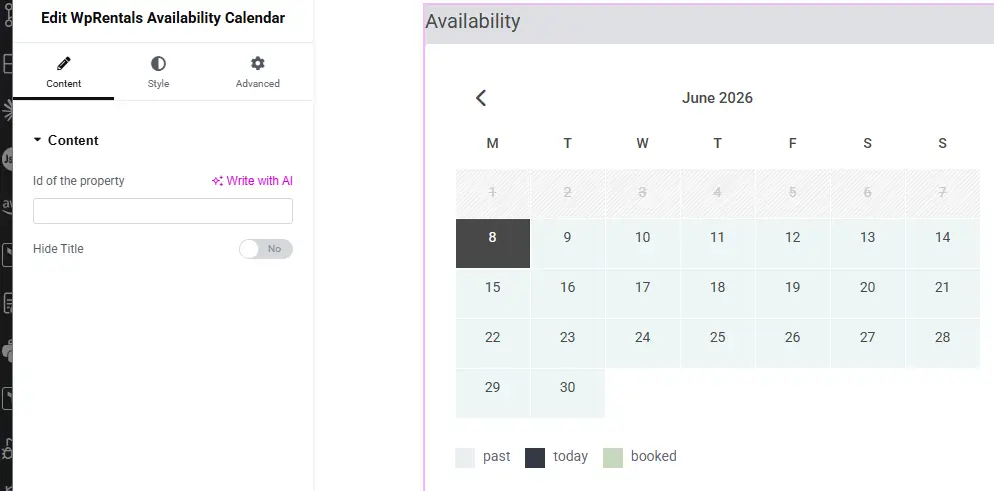
- In the Elementor sidebar on the left, search for “Availability Calendar”. You’ll see it appear in the widget panel, under the WPRentals group.
- Simply drag the widget into a section.
- In the Content tab, paste the Listing ID for the property (find it at WP Admin » Listings, in the ID column). The calendar refreshes in the Elementor preview with that property’s real availability.
- Optional: set “Hide Widget Title” to Yes if you don’t want the widget label above the calendar.
- Click Publish (or Update for an existing page).
- Open the page in a new tab and confirm the correct property’s calendar appears, with booked and open dates showing.
Your calendar is now live, showing booked and open dates just as your guests will see them.
The calendar reflects the blocked dates set in each property’s WPRentals settings: Elementor controls the display, not the booking rules. For OTA sync, export a property’s iCal feed into Airbnb or Vrbo to prevent double-bookings.
“Won’t the calendar auto-detect which property I’m on?” Not on a standard Elementor page. It always shows the hardcoded Listing ID you entered. Auto-detection only happens inside a Studio template.
Inside a WPRentals Studio Single Property Page template
Inside a Studio Single Property Page template, skip the standard Elementor booking calendar widget (Availability Calendar) and use the Property Page Availability Section instead. It’s context-bound, so no Listing ID field appears in the Content tab. One template serves all three cabins.
Adding the Booking Form to any Elementor page
Alongside your Elementor booking calendar, the Booking Form widget puts a full booking form on any page.
Open the page in Elementor and, in the WPRentals widget group, search for the booking form widget (try “Booking Form”). One heads-up: the WPRentals help doc has a copy-paste slip here, telling you to search for “WpRentals Categories List”. If your doc shows that label, it’s a documented error. You want the booking form widget, not a categories grid. Add it, then paste the property’s Listing ID as you did for the calendar.
The booking form is now live on the page and pulls every setting from your Theme Options.
Two optional toggles trim the form: Hide Favorites & Contact Section, and Hide Social Section. For styling, the Content tab exposes Container Padding, Box Shadow, and Container Background Color.
The form itself is the real deal, not a stripped-down version. WPRentals documentation states: “The form will display the same fields and settings as on the property page, and it respects the global options you’ve configured in WpRentals → Theme Options -> Booking Configuration.” That’s because WPRentals works as a WordPress booking plugin with calendar and payment handling, where the form’s behaviour lives in Theme Options, not Elementor.
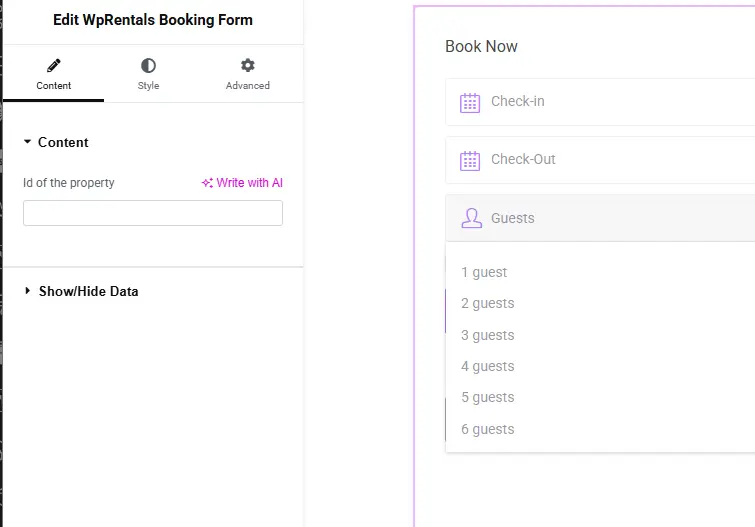
The guest number field, date format, daily-versus-hourly mode, and the option to show a contact form instead all live in Theme Options » Booking Configuration, and so do payment gateways like Stripe and PayPal. Inside a Studio template, use Property Page Booking Form instead, which is context-bound and needs no Listing ID.
Building a search form in Elementor with the Search Form Builder
The Search Form Builder creates a search form for the specific page it sits on, which is what makes it different from your site-wide search. As the WPRentals Search Form Builder documentation explains: “The Elementor Search Form Builder applies only to the page where the widget is added. Other pages continue to use the global search form configured in WPRentals Options » Search » Advanced Search Form.”
Here’s how to place one:
- Open the page in Elementor and search for “Search Form Builder” in the widget panel.
- Drag it into a section.
- In the Content tab, open the Fields tab. You’ll see a drag-and-drop field list where you can add, remove, and reorder fields and set labels. Then assign each field its compare rule. Don’t worry if the compare-rule column looks unfamiliar; it’s the step most people get wrong, and we’ve watched it break plenty of setups, so the reference table below maps out every field.
- Still in the Content tab, add any custom listing fields you created in WPRentals Options » General » Listing Custom Fields.
- Use the Style tab for layout and colours (details in the next section).
For the Blue Ridge cabin homepage, four fields do the job: City (Like), Check-in (Date Greater), Check-out (Date Smaller), and Guests (Greater). Your search form is ready.
Compare-rule reference table
Set the wrong compare rule and WPRentals returns zero search results, the single most common setup failure. So keep this table handy.
| Field | Compare Rule |
|---|---|
| Location | Like |
| Check-in | Date Greater |
| Check-out | Date Smaller |
| Guests | Greater |
| Price | Greater |
| Listing City / Area / Category / Type / County / State / Country / Zip | Like |
| Bedrooms / Bathrooms / Rooms / Size | Greater (or Equal / Smaller) |
| Beds and Baths Component | Equal |
| Features and Amenities | Feature field settings |
| Custom field (text or dropdown) | Like |
| Custom field (number) | Greater / Equal / Smaller |
| Custom field (date) | Date Greater / Date Smaller |
Styling your booking widgets in Elementor
Each booking widget has its own style controls, and they vary a lot. The Availability Calendar gives you Container Padding, Date Box Height, Box Shadow, and Container Background Color in Elementor.
Here’s the catch with your Elementor booking calendar. The day and date cell colours (Calendar Background Color for Day, Font Color for Day, and Internal Booking Color) are global, set at WPRentals Theme Options » Design » Calendar Colors, not per-widget. Change your “booked date” colour there and it changes on every calendar at once: homepage, landing page, and Studio template.
The Booking Form is similar: Elementor gives container-level controls only, not field-level styling.
The Search Form Builder is the most flexible of the three: column count, row spacing, form gap, label colour and typography, full field-level styling, and full button styling. The Availability Calendar and Booking Form stay container-level only.
Does conditional visibility for booking widgets require Elementor Pro?
Yes, for Elementor’s native Display Conditions. Dean Issacharoff, Product Marketing Manager at Elementor, confirms it in the official announcement: “This feature will be available in the Advanced, Expert, and Agency Elementor Pro subscriptions as well as all of the Elementor Hosting subscriptions. As a special exception, this feature will be available for Legacy Essential subscriptions purchased before December 4th, 2023.” So showing or hiding widgets by login status, role, date, or page type with Elementor’s built-in tools needs Pro (Advanced tier or above).
Your Elementor booking calendar itself runs fine on the free tier, so try the free paths first. WPRentals natively lets you replace the booking form with an owner contact form, globally or per listing. When active, visitors send an inquiry instead of a booking.
We’d also point you to the free Visibility Logic for Elementor plugin, which adds per-widget show/hide rules for logged-in status, user role, device type, and more.
A few practical calls:
- A “Book Now” section only on property pages is handled by Studio template assignment, no visibility logic needed.
- Hiding the calendar from logged-out visitors needs Pro Display Conditions or the Visibility Logic plugin.
- A different search form per page is just two separate Search Form Builder widgets on two pages.
Note: conditional visibility plus aggressive page caching (WP Rocket or another page cache) can serve the wrong state, showing hidden elements or hiding visible ones. Test with the cache cleared before going live.
| Feature | Elementor Free | Elementor Pro |
|---|---|---|
| WPRentals Availability Calendar widget | Yes | Not needed |
| WPRentals Booking Form widget | Yes | Not needed |
| WPRentals Search Form Builder | Yes | Not needed |
| WPRentals Studio templates | Yes | Not needed |
| Display Conditions (conditional visibility) | No | Required (Advanced/Expert/Agency tier) |
| Dynamic Tags for dynamic content | No | Required |
| Theme Builder (template system) | No | Required (replaced by WPRentals Studio for WPRentals sites) |
Key Takeaways
- The WPRentals Availability Calendar widget runs on Elementor Free, so no Elementor Pro licence is required for any booking function.
- Standalone Availability Calendar and Booking Form widgets need a hardcoded Listing ID; WPRentals Studio templates auto-bind to the viewed property instead.
- Every Search Form Builder field needs the right compare rule, for example Check-in as Date Greater and Check-out as Date Smaller, or search returns empty.
- Elementor Display Conditions require Elementor Pro (Advanced/Expert/Agency tier); the free Visibility Logic for Elementor plugin covers most show/hide cases.
- Calendar day cell colours are global, set in Theme Options » Design » Calendar Colors, and can’t be styled per widget in Elementor.
Frequently Asked Questions
Do I need Elementor Pro to add a booking calendar?
No. WPRentals’ Availability Calendar, Booking Form, and Search Form Builder all work with Elementor Free. Elementor Pro is only needed for Display Conditions, the native show/hide-by-user-role feature. For most vacation rental sites, the free Visibility Logic for Elementor plugin covers that need without a Pro licence.
Why is my availability calendar showing the wrong property?
The Availability Calendar widget needs a Listing ID in its Content tab. If the calendar shows the wrong property, or no data at all, check that the ID matches the right property at WP Admin » Listings, in the ID column. Inside a WPRentals Studio Single Property Page template, use the Property Page Availability Section widget instead, which auto-binds and needs no Listing ID.
Why are my search results empty after I add the search form?
The usual cause is a wrong compare rule on one of the search fields. Each field in the Search Form Builder needs a specific rule: Check-in must be Date Greater, Check-out must be Date Smaller, and Location or City must be Like. The wrong rule returns zero results. WPRentals documents the full compare-rule matrix so you can match every field to its correct rule.
Can I style individual calendar date cells with Elementor?
Not per widget. Elementor’s style panel for the Availability Calendar covers container-level settings: padding, background colour, box shadow, and date box height. Individual day cell colours (available dates, booked dates, and internal bookings) are set globally in WPRentals Theme Options » Design » Calendar Colors, and that change affects every calendar on the site.
And that’s it! You’ve now got a working Elementor booking calendar, booking form, and search form on your WPRentals site, with no Elementor Pro licence needed.
You might also want to check out:
We hope you found this guide helpful!



