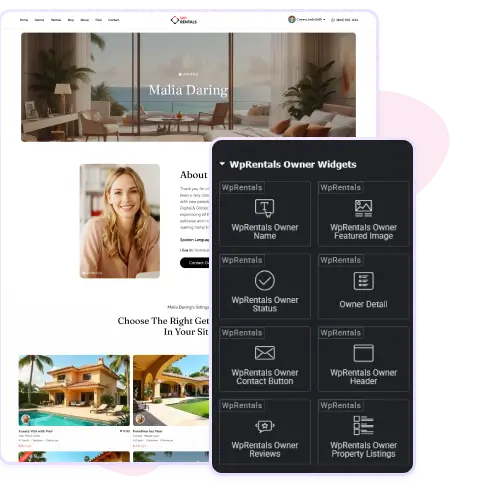
When someone becomes an owner on WpRentals, a dedicated profile page is created for them. The profile shows their picture, name, bio, and location. Underneath, it also displays all the properties they’ve listed.
Visitors can review the owner’s work and easily browse their listings in one place. This clear page helps build trust between renters and owners because people can see who they are dealing with and what properties they offer. It makes your rental website feel more personal and transparent.
Add Widgets and Extras to Owner Pages
Owner pages in WpRentals include a special widget area just for those profiles. You go to Appearance → Widgets in WordPress and drop in any widget you want, like “Recent Reviews”, “Owner’s Social Media”, or “Top Listings”.
The widgets appear in the sidebar of each owner profile. That means you can customize what extra info shows for each owner without editing code. The sidebar makes the owner page richer and more useful for people exploring the owner’s work and reputation.
Manage and Verify Owners for Credibility
Your site manager can verify owner accounts and adjust what appears on their profile pages in WPRentals. You can mark an owner as “verified” once you check their identity or property photos.
This badge then appears on their page and shows visitors that the owner is trustworthy. You can also control whether contact details show immediately or only after a booking is confirmed. With this setup you keep owner pages safe and reliable for users, making your platform stronger and more professional.
Use WPRentals as a Single Owner
WPRentals is just as powerful for a solo rental business as it is for multi-owner platforms. If you are the only owner and you need to add one or more listings to your site, WpRentals lets you manage everything from a single account.
Add your properties, set your booking rules, update availability, and control pricing directly from your dashboard. You can hide the owner-registration features and submission buttons so visitors register just to book your listings, creating a clean and focused site for a single host or small rental business.
Built-In Protections for Owners, Guests, and Admins
WpRentals includes secure forms that keep all communication inside the platform. Guests can reach out through the contact form, but owner details stay hidden until a booking is actually confirmed. This helps prevent direct contact outside the site and makes sure your service fee is protected whenever it’s enabled.
As the site admin, you can also keep an eye on conversations to make sure everything runs smoothly. You’ll receive a copy of each message sent between users, so nothing slips through the cracks. It’s an easy way to maintain transparency, protect your revenue, and offer a safer experience for everyone using your rental website.