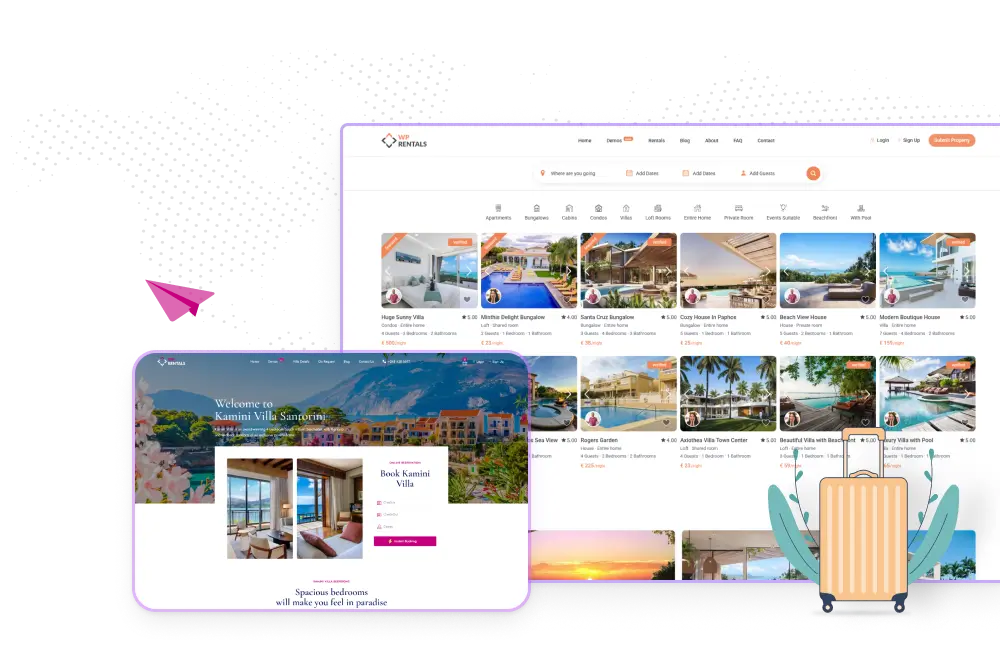
Select a demo and get your site live with one click
for Design Quality
This is by far one of the most professional and complete themes I’ve worked with. The design quality is excellent, it's packed with features, and everything is well-documented. But what...
Caddy8 on 2025-05-11
for Customer Support
Customer support is very responsive and aims to find solutions even when they are very specific, I recommend.
osalesse1 on 2025-04-15
for Feature Availability
The theme is a real springboard for getting started in this field of activity, with a comprehensive information history and regular updates. Responsive and accurate support. Thank you for your...
JVJH44 on 2025-04-07
for Flexibility
I absolutely love this theme and the incredible work you guys have put into it! I'm truly impressed by the level of customization and simplicity it offers. I've purchased many...
debsahoo188 on 2025-03-22
for Feature Availability
Features loaded theme and most importantly effective and timely support. Highly recommend.
Fabnneoma on 2025-02-19
for Customer Support
Excellent Customer support, they answer my questions very quickly.
leonthecat on 2024-12-24
for Design Quality
I’ve been using this theme for quite some time now. Over the years, it has consistently proven to be a great fit for my property rental business. Easy to use,...
jackbrent on 2024-11-12
for Customer Support
I’ve been using WP Rentals for a while now, and it’s an outstanding plugin packed with functionality for both owners and travelers. The integration with WooCommerce adds flexibility for managing...
leadingc on 2024-11-25
for Customer Support
I am really happy with the product; it’s very nice and fits my needs perfectly. Additionally, the customer service is fantastic. I am a beginner and asked many questions, and...
corrado7x on 2024-11-09
for Code Quality
Thanks to the team. The theme is working fine and have been able to use it. Recommended!
diegoestevezv on 2024-11-04
for Customer Support
Very fast and perfect support. They answer all my questions very quickly and help me find a solution.
evaypetra on 2024-11-28
for Design Quality
I had several projects going and I used Listio first. Then for the other project, I used WP Rentals. I like it so much better that I will be changing...
MtnstoSea on 2024-11-17
for Customer Support
Excellent customer support. Had an issue that haunted me for weeks and the customer support team was able to quickly resolve it, highly recommend this theme.
rockypointgraphics on 2024-11-21
for Customer Support
I’m thoroughly impressed with WP Rentals for their great and consistent level of customer support! Their support team is remarkably responsive, reliable, and genuinely helpful. The well documentation and insightful...
Tech_work on 2024-11-30
for Design Quality
This is a fantastic theme if you need a website that acts a little like booking and Airbnb. It was quite easy to use, gives so many options and they...
Manuelasmar on 2024-11-06
for Customer Support
The answers to the tickets are on time and I really feel that someone is trying to understand what the problem is! I will buy more themes from the team!...
chrisev on 2024-11-23
for Customer Support
I've been using WP Rentals for my vacation rentals, and it's made a huge difference for my business. I couldn't be happier with the results! I've given 5 stars for...
jacksylvaine on 2024-11-13
for Documentation Quality
Very clear, they put effort into making it accessible to everyone.
moonlightmarketingbrasil on 2023-11-09
for Customer Support
Very good Theme for multiple accommodation. Highly recommended if you look for a template with many options and high development. Customer service is very helpful and quick to answer.
sophieantoine2016 on 2023-11-18
for Design Quality
The theme is great for holiday rental accommodation. Linking to other calendars is simple (e.g., VRBO, Airbnb), and support from the vendor has been top class. The Elementor editor takes...
Help users find the perfect rental quickly with advanced filters for location, price, dates, and amenities. Real-time search results update instantly as they refine their choices, delivering a faster and more intuitive browsing experience.
Advanced Booking Form
Let guests book faster with smart date selection, flexible pricing rules, and instant availability checks that update in real time. Provide a smoother booking flow that reduces friction and helps convert more visitors into confirmed guests.
WPRentals API
WP Rentals API helps developers build rental platforms on WordPress. It allows them to create, update, and manage property listings, bookings, and availability directly through API requests.
Listing Page Templates
Choose from five ready-made templates that organize property details for the best user experience. Each template is built for flexibility, letting you switch layouts without touching code.
Combine key features like price, gallery, availability, and reviews to match your business style.
Booking Form
Booking form with price details, advanced guests and availability calendar
Price section
Price section with full rate breakdown, extra fees, and custom periods
Availability calendar
Interactive availability calendar showing booked and open dates
Listing Details
Property description, amenities, and sleeping arrangements in clear sections
Owner Section
Owner profile with verified details and direct contact option
Map & Reviews
Map and guest reviews that build trust and show real experiences
Listing Type 1
Listing Type 2
Listing Type 3
Listing Type 4
Listing Type 5
Advanced Booking System
Property owners can set custom rates per night for specific periods, weekends, or stay length, manage availability, and choose instant or manual booking approvals.
Guests benefit from real-time date selection, accurate pricing updates, and clear availability information before confirming a reservation. The system supports per night or hourly rentals, security deposits, and extra service fees.
Custom price per night or hour
Offer a discounted price per night or hour for longer booked periods. These values can be overwritten from the custom price panel for specific dates.
Early-bird discount
For booking requests beforehand users can get an early bird discount. The percentage will show in the booking request form for a minimum number of nights in advance.
Select turn-over nights
Set specific days of the week for a visitor to check-in and/or check-out (turnover days). In the custom price area you can apply the settings for just a limited period.
Select turn-over nights
Set specific days of the week for a visitor to check-in and/or check-out (turnover days). In the custom price area you can apply the settings for just a limited period.
Minimum number of nights
This option lets you add a minimum number of nights a guest can stay to ensure the booking length. The number can be overwritten for specific periods too.
City fee
The city fee can be applied as a single fee, a fee by night, by guest, by night and guest, or as a percentage from the total booking rate.
Dashboard - Your Listings
Edit Listing - Price Details
Dashboard - Your Bookings
Dashboard - Generate Invoice
Front page - Booking Form
WP Rentals Studio
Build any layout visually with WP Rentals Studio, the no-code template builder for Elementor. Use dedicated widgets to design pages exactly how you want. Adjust structure, move elements, and style each detail without touching code.
WP Rentals Studio lets you create custom templates for any part of your website, including the single property,header, footer, owner page, taxonomy pages, and post pages.
Drag & Drop
Drag-and-drop widgets for every property section, including price, booking, and reviews.
Works with Elementor FREE
Works with the free version of Elementor for full live editing and layout control.
Customize everything
Build and customize templates for headers, footers, owner pages, taxonomy pages, and posts.
Reusable Templates
Save templates and apply them site-wide for consistent design and faster setup.
No Coding Required
Designed for developers, agencies, and property owners who need precise control without coding.
Dynamic Data
Supports dynamic data from listings, users, and bookings to keep all pages automatically updated.
Studio Template - Admin Area
Studio - Property Page Template
Studio - Property Owner Template
Category Template
Header Template
Footer Template
Properties List Pages
WP Rentals displays your listings in a clean grid that you control from the theme options. You can choose between the Standard layout or the Half Map version and decide if you want a sidebar when the layout supports it.
Guests can filter and sort properties instantly with AJAX options for price, location, date, and more without page reloads. Filters work across all properties, making navigation fast and simple.
The Properties List template lets you show all rentals or only specific categories, cities, areas, or property types. This gives you full flexibility to build curated lists or directory-style pages.
You can also add a map alongside the results with the Map with Listings widget or use the Half Map layout to display listings and the map together in one view.
WP Rentals is fully responsive and adapts to any screen size. Guests can browse, book, and manage reservations smoothly on desktop, tablet, or mobile without losing features or speed.
iCal Sync with booking platforms
Keep your availability accurate across all major booking channels with built-in iCal synchronization. WP Rentals connects seamlessly with Airbnb, Vrbo, and other platforms to import and export bookings automatically, preventing double reservations
Monetize Your Listings
With WP Rentals, owners can list their properties, set prices, and earn income directly from your website. They manage bookings and payments easily, while you collect service fees or commissions from each reservation.
Four Property Card Styles
WP Rentals offers multiple property card layouts you can choose from.
Listings can be shown in either list or grid view, allowing you to match your website’s design.
These flexible settings make it easy to present your properties clearly and attractively.
WP Rentals includes an advanced property search built for rental websites. You can add unlimited search fields such as dropdowns, text, numbers, or dates, and choose which ones appear for each listing type. Users can combine multiple filters to narrow results precisely.
The search supports location autocomplete through Google Places or OpenStreetMap and can use Geo Location so visitors find rentals nearby, in miles or kilometers.
It runs smoothly with AJAX, especially in the Half Map layout, so filtering doesn’t reload the page. You can place the search bar above, below, or over the header to fit your site’s design.
Unlimited Custom Search Fields
You can build custom search forms with unlimited fields, using the theme’s default options or your own custom fields to match your site’s needs.
Radius search and geolocations
Search for rental properties near a chosen point on the map, using either miles or kilometers for distance.
Location search
The location search field supports Google Places or Algolia autocomplete, allowing users to find properties by country, state, area, or city.
Half map results
Show search results in a Half Map layout, with the map on the left and the search fields and property list on the right. You have full control over which fields appear in this form.
Advanced Dashboard
The WP Rentals dashboard gives every user a complete front-end control panel for managing their rental activity. Property owners can add new listings, edit details, upload images, set prices by day, week, or month, and update calendars to show availability in real time. They can also handle booking requests, approve or reject them, and manage payments, deposits, and invoices directly from their account.
Guests have their own dashboard view where they can track reservations, send or receive messages, review past stays, and download invoices. The dashboard also includes sections for editing personal profiles, updating payment methods, and managing membership or subscription packages.
All actions update instantly with an easy-to-use interface designed to work smoothly on both desktop and mobile devices. This front-end system eliminates the need for users to access the WordPress admin area, offering a professional and intuitive way to manage every step of the rental process.
Payments & Money
Booking service fee to admin
As site admin you can charge a service fee for every confirmed booking deducted from total value. The fee may be a percentage of the booking price or a fixed amount. The owner contact details will be shown for confirmed bookings only.
Deposit fee to admin
From admin, you can set the deposit value in percentage or as a fixed rate. The fee applies to every booking and will show in user dashboard for each reservation. The deposit can be 0, or can be set to include the service fee only.
Pay remaining balance to admin
The user will see the remaining balance to be paid and is able to pay it to site admin from his dashboard. For this option, the theme sends a reminder 3 days before start of booking.
Membership Submission
Create membership packages for each user role, and set for each package the number of included listings, a number of featured properties included, and package duration in days, weeks, months, or years.
Paid Submission
Enable the possibility to pay per listing and each user who wishes to publishes a property will have to pay a fee before. The theme allows you to add an extra fee to make a property featured.
Recurring membership payments
WpRentals supports recurring membership packages for property submission. Users will see the recurring checkbox when upgrading their free trial to a paid membership package.
PayPal payments
Just add your PayPal account API details and the payments will automatically be processed to your PayPal account, be it regular or recurring membership submission payments.
Stripe payments - SCA Ready
WpRentals theme works with Stripe, a trusted credit card payment system. In site admin, add your own Stripe account API details, and the money received through the theme will be directed to your Stripe account.
WooCommerce Payments
if you need a different merchant to process payments for deposit or paid submission, install WooCommerce free plugin and use their supported merchants. The theme supports this option as alternative to theme Paypal and Stripe.
Wire transfer
Users can make offline payments to you using Wire Transfer and send you the amount directly to your back account. From admin, you will activate their booking after you receive the payment confirmation.
Invoice details
The registered user can see generated invoices in user dashboard when confirming a booking. Also, when buying a membership package or a paid listing an invoice is automatically issued. The user can filter and sort invoices by date and print them.
Choose payment currency
From admin, set the payment currency using a dedicated drop-down that lists all currencies supported by PayPal or Stripe. Additionally, in theme options, you can add any currency you need if you choose Wire Transfer as payment method.
Favorite Listings
Visitors can save their favourite properties for future reference. All saved listings appear in a dedicated section of their personal dashboard, where they can view, compare, or remove them at any time. Registered users can easily access this list whenever they log in.
SMS by Twilio
Enable SMS alerts through Twilio by adding your credentials in Theme Options. Messages are sent for actions like registration, phone validation, or listing approval to verified phone numbers.
Private Messaging
Users can send private messages to property owners and reply quickly. All conversations are stored within the user dashboard, so past messages remain easily accessible for reference.
Instant checkout with WooCommerce
Let users complete payment as soon as they decide to book by enabling the Instant Checkout option. The login and registration steps are handled automatically during the payment process, streamlining the experience for both guests and site administrators.
Email Notifications
WPRentals includes a built-in email notification system that keeps everyone informed at every stage of the booking process. Automated emails are sent for new reservations, payment confirmations, cancellations and inquiries.
User Roles
WPRentals supports flexible user roles to keep site operations organised and secure. Admins control global settings, owners manage listings and bookings, and renters handle their reservations and payments. Each role is assigned specific permissions to ensure clarity of access and responsibility.
All-in-one Calendar
With WPRentals you get a unified calendar where owners manage availability, bookings, and pricing in one place. iCal import/export support lets you sync blocked dates from external platforms
Move the map to find properties
Enable a dual view that displays listings alongside a map interface. Users can view properties in list form while dragging and zooming the map to refine results. The admin sets up the search tool and its behaviour.
Multi-currency widget
Use the built-in multi-currency widget to show prices in different currencies for visitors. Exchange rates are defined in theme settings and change the display only (payments still processed in your base currency).
Compatible Plugins
WP Rentals integrates smoothly with major plugins like WooCommerce for payments, Elementor and WPBakery for page design, and WPML for multilingual websites. It also includes its own core and Gutenberg add-ons that power key theme features.
You can optionally use integrations like Revolution Slider or Ultimate Addons to enhance layouts and extend design flexibility across your rental website.