Flexible Nightly and Hourly Rentals Made Simple

Manage bookings your way with WpRentals. Offer per night or hourly rentals, set pricing rules, deposits, discounts, and instant booking options.

Price Per Night or Hour with Full Flexibility

A rental setup that adapts to different renetal setups

instant booking

Instant Booking Option

Allow guests to book instantly without owner approval. Speed up reservations and reduce management time for trusted hosts and verified users.
Custom Cancellation Policies

Cancellation Policies

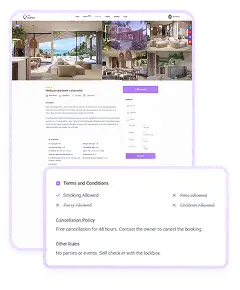
Set custom cancellation terms per listing so guests know how many days before arrival they can cancel and what percentage is refundable. These rules are informational only.
Security Deposit Settings

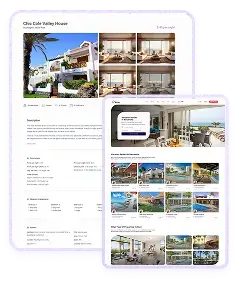
Add security deposits to protect against damages. Owners can set a fixed amount as a deposit. Refunds are handled manually by the site admin.
Early-Bird Discounts

Encourage advance bookings with automatic early-bird discounts. Choose the percentage and how many days in advance the offer applies.
booking type model

Flexible Booking Type Model

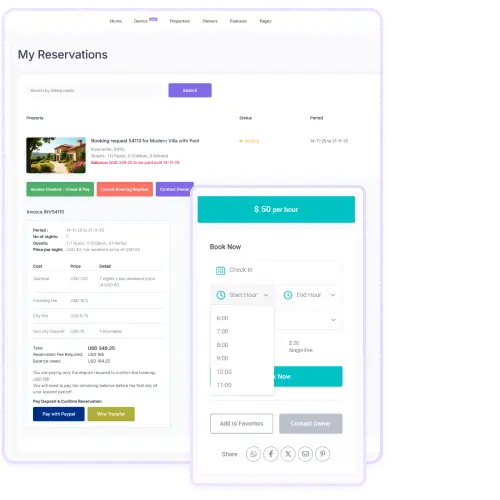
WpRentals lets you choose how bookings are calculated: per night, per hour, or a mix of both. Each listing uses the pricing model you set globally or the one the owner selects when mixed mode is enabled.

For longer stays, the theme supports special pricing that you manage from Theme Options → Booking Settings. You can set reduced rates for stays longer than 7 or 30 nights, and for bookings longer than 7 or 30 hours. Owners only add their base daily or hourly price, and the system automatically applies the correct long-stay rate when a booking exceeds those limits.

This gives you consistent pricing for extended rentals while still letting each owner control their main rate.

Weekend & Long-Stay Pricing Rules_

Weekend & Custom Price Settings

WPRentals lets you set different prices for weekends and for specific dates. The site admin chooses which days count as weekend in Theme Options. Once this is set, owners can add a weekend price in their listing, and that rate applies to those days instead of the standard nightly or hourly price.

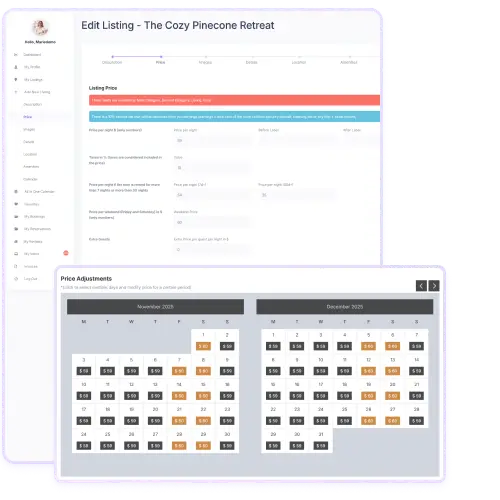
Owners can also set custom prices for specific dates or date ranges. By selecting days in the custom-price calendar, they can override the regular rate, the weekend rate, and any long-stay prices for those selected dates. This makes it easy to adjust pricing for holidays, peak seasons, or special events.

These options give owners full control to fine-tune their rates based on timing and demand.

Advanced Guest Selector & Rental Type_ (1)

Advanced Guest Selector & Rental Type

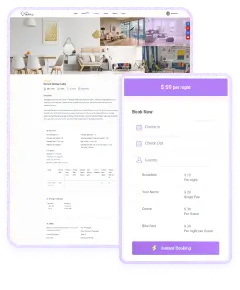
The guest selector settings in WpRentals allow detailed control. You can enable separate guest counts for adults, children, and infants, or keep it simple with one dropdown total.

There’s also a rental type switch: “Vacation Rental” shows guest numbers in the booking form, while “Object Rental” (equipment, items) hides the guest field and uses “day” instead of “night”.

This means the system adapts based on what you rent: a full home or gear. It helps you tailor the user experience and form fields to match your rental business.

Booking & Contact Form Display Control_

Booking & Contact Form Display Control

WpRentals gives you options for how the booking form appears. You can choose to show a full booking form on each listing page, or instead display a simple contact/inquiry form if you want users to ask before booking.

Additionally you can require users to check a terms-and-conditions box before they submit a booking request. This helps you make sure they acknowledge your rules.

These settings allow site owners to decide how much automation vs manual approval they want.

Calendar Settings_

Listing Submission & Price/Calendar Settings

When owners edit or submit a listing in WpRentals they see a comprehensive “Edit Listing” form. They fill in description, pricing (daily or hourly), images, details, location, amenities and calendar. They can set minimum nights/hours, weekend price, and custom price periods. They also choose if their listing is hourly or daily. The calendar view allows owners to adjust availability and custom pricing. This gives owners full control of their listing and ensures the front-end booking form shows accurate details to guests.
Calendar Format & Display Controls_

Calendar Format & Display Controls

Within the theme settings you control how the calendar behaves and appears. You can select the date format (yy-mm-dd, mm-dd-yy, etc.), set the language for date pickers, and define how many months into the future bookings show (e.g., 12 months).

A larger number can slow page loading, so balancing reach vs speed is important. These controls help you tailor the booking interface to your audience and region, making the site easier to use for visitors.