WPRentals Property List Templates

Show rentals in style with WPRentals property list templates. Use maps, filters, and layouts to help guests find the perfect stay.

Multiple Layout Options for Property Listings_

Multiple Layout Options for Property Listings

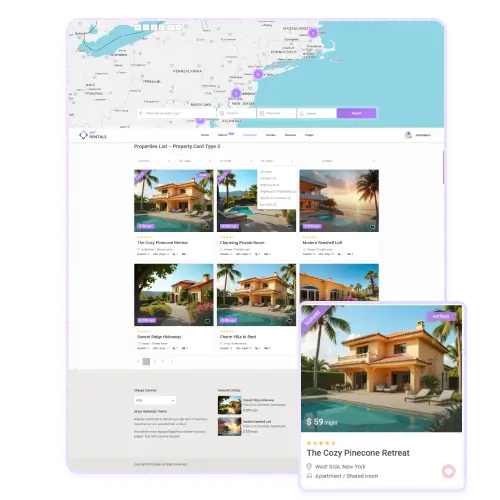
WpRentals offers flexible templates to display your properties in the layout that fits your business best. You can choose between standard, half map, or sidebar layouts.

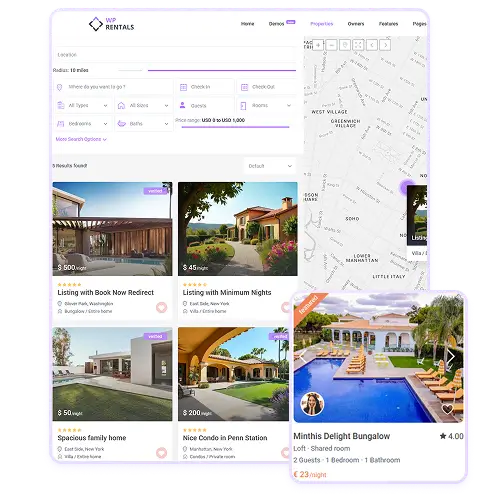
Each layout shows listings with key details such as price, property type, and rating while maintaining a clean, modern look. The half map view helps users see both listings and their location instantly, improving the browsing experience.

Whether you manage a small portfolio or hundreds of rentals, these layouts help you present properties clearly and attractively to potential guests.

Advanced Search and Filtering Tools

Visitors can easily find the perfect rental using the powerful search and filtering options built into each listing template. The search bar supports location, date, guest count, and property type filters. Additional settings allow users to refine results by price, room size, or number of bedrooms and bathrooms. The interactive slider for radius and price range adds flexibility for local or wide searches. These tools make it fast and easy for guests to discover listings that match their exact needs.
Interactive Map Integration_

Interactive Map Integration

Each WpRentals property list template includes an interactive map powered by Google Maps.

The map displays listings with visual markers or clusters, helping users see exactly where properties are located. As visitors zoom in or move around the map, the list updates automatically to show nearby rentals.

This real-time interaction makes searching more intuitive and location-focused. The map integration gives guests a better sense of distance, nearby attractions, and neighborhoods before booking.