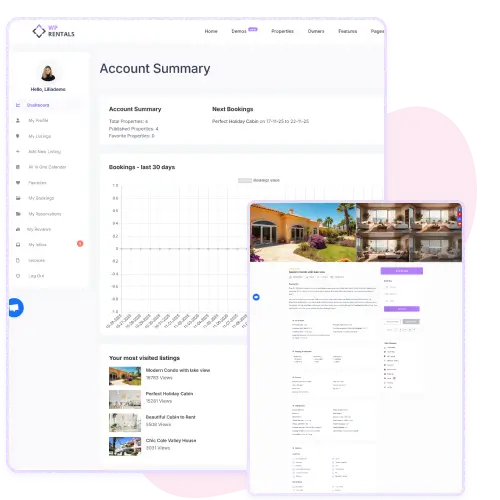
Manage your entire rental business from one place. Add listings, track bookings, reply to guests, and organize everything.
The dashboard gives users a clear summary of their activity. It shows published listings, total properties, favorites, and recent bookings in one place.
You can easily track performance through a bookings chart that updates automatically. The summary helps owners understand what’s working on their listings and where to improve.
It’s a simple and data-focused overview designed to keep property management organized without extra effort.
Users can manage personal details, contact information, and social links directly from their profile.
There’s built-in support for phone number validation and SMS notifications. The section includes fields for payment details, bio, and social media links, helping hosts present a complete professional profile.
Updating information is quick, and changes reflect across all listings instantly. This keeps the rental experience more secure and transparent.
The My Properties section lists every rental owned by the user, including price, reviews, and publishing status.
It provides direct access to edit, duplicate, or delete listings. Each property card includes links to location and category for quick reference.
This centralized view simplifies portfolio management, especially for users with multiple listings, ensuring full control without navigating through multiple menus.
The Add New Listing feature uses a step-by-step form to make property setup simple. Users can fill in details like title, location, amenities, and price.
Uploading photos and assigning categories is straightforward, and the built-in validation ensures required fields are complete before publishing.
It’s designed for non-technical users who want to publish new properties quickly while maintaining consistent listing quality.
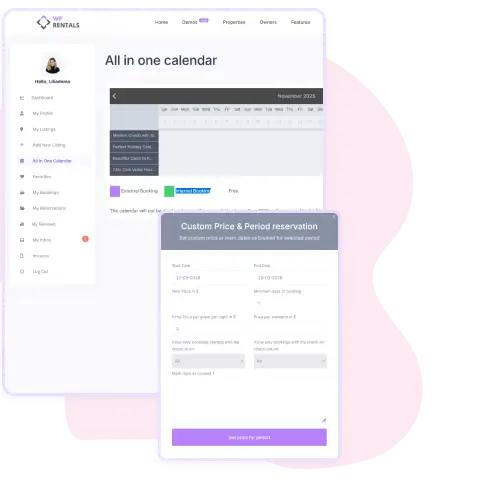
The All-in-One Calendar displays all booking activity in a single view. Each booking type is color-coded, showing external, internal, and available dates.
Owners can manage availability and prevent double bookings easily. It’s especially useful for hosts managing several properties, helping them stay organized.
The visual layout makes it easy to identify free dates at a glance and plan future rentals more efficiently.
Users can bookmark properties to access them later in the Favorites section.
It’s helpful for guests comparing rentals before booking or for repeat visitors who prefer specific homes. Each saved property includes price, reviews, and quick access to view details.
The list is automatically stored in the user account, ensuring favorite selections remain available across sessions.
The My Bookings section organizes all active and past booking requests. Users can view guest details, booking status, and payment balance in one place. Each entry includes buttons for issuing invoices, sending reminders, or rejecting requests.
This control panel keeps communication and management in one interface, making it easier to handle transactions and respond to clients quickly.
The My Reviews page lists all reviews received on the user’s properties. Each entry shows guest feedback, star rating, and a quick reply field.
Owners can respond directly to improve communication and reputation. The clear layout makes it easy to track performance across listings. Reviews help build trust and attract new guests through honest user experiences.
The My Inbox feature provides a simple way to read, organize, and respond to messages directly from the dashboard. Unread messages are clearly marked, and communication history is stored for each conversation.
It reduces the need for external email exchanges, keeping all booking-related communication inside the platform. This improves response time and ensures nothing important gets lost.