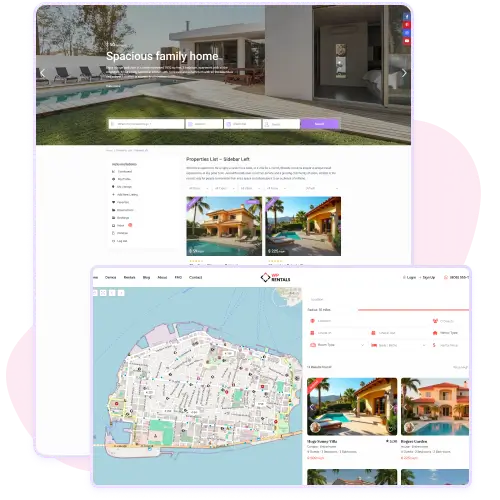
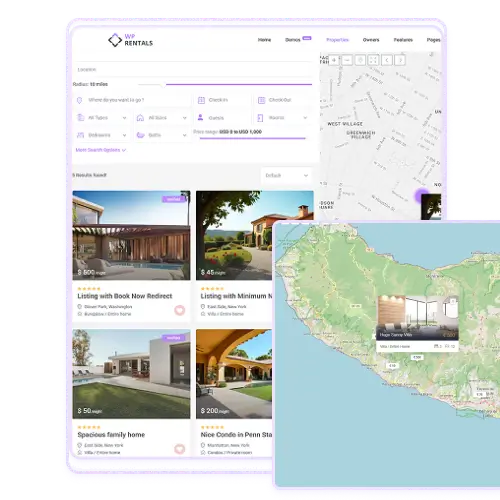
The WpRentals Search Results Page gives you full control over how listings appear to visitors. You can choose between a standard list layout or a half map view that combines property results with an interactive map.
This flexibility helps users find properties visually or through details, depending on their preference. The half map layout is ideal for users exploring rentals by location, while the list layout keeps everything clean and easy to scan. Both styles maintain responsive design, ensuring results look great and function smoothly across desktop, tablet, and mobile devices.
Dynamic On-Demand Map Pins
With the on-demand map pin option, your site loads only the listings that are currently in view. This speeds up map navigation and enhances performance, especially on large databases. As users move or zoom the map, new pins appear instantly without needing a full reload. It creates a fast and interactive experience for visitors searching by area.
This feature works perfectly on half map pages, helping users explore listings effortlessly. It also reduces server load while giving potential renters a smoother, more responsive search process across different locations.
Customizable Sorting Controls
The Search Results Page in WpRentals lets you control the default order of listings shown to users. You can sort by price, newest, oldest, or even number of bedrooms or bathrooms.
This helps you prioritize the most relevant properties for your audience. For example, luxury sites might show the highest-priced rentals first, while others may focus on recent listings. Each option gives users flexibility to find what they need faster.
The customization applies globally to your advanced search results, keeping your site experience consistent and user-friendly.
Auto-Filled Booking for Dates & Guests
When visitors search using dates or number of guests, the Search Results Page shows only the properties that match those criteria.
After users click on a listing, the booking form on the property page automatically fills in the selected dates and guest number. This makes the booking process quick and straightforward, without requiring users to re-enter their information.
Half Map Layout (Map on Left or Right)
For a more interactive browsing experience, the Search Results Page can use a Half Map layout, displaying listings on one side and an interactive map on the other.
You can choose whether the map appears on the left or the right.
Pins update dynamically as users scroll or move the map, helping visitors explore properties by location instantly.