
You know that feeling when you scroll through Airbnb and think, “I could build something better than this”? Well, you’re probably right. And if you own a cabin (or are thinking about getting into the vacation rental game), creating your own booking site isn’t just possible, it’s actually pretty clever.
Every time a guest books through a central platform, you’re losing 10-15% in fees. That’s your hard-earned money. By creating your own booking site, you’re not just saving on these fees, but also taking control of your business. No more sending your guests to shop around on someone else’s website. It’s all about building your brand and fostering repeat customers.
I’ve helped dozens of property owners build their booking sites, and let me tell you. It’s way easier than you’d think. WordPress makes it possible, even if you’ve never touched a line of code.
Getting Started: The Foundation That Won’t Crumble
First things first: you need proper hosting. I can’t tell you how often I’ve seen beautiful booking sites crash during peak season because someone went with the cheapest hosting plan they could find. Don’t be that person.
You’ll want managed WordPress hosting with SSL certificates included. SSL is a security badge that tells guests their payment info is safe. Without it, browsers literally warn people away from your site, which is not, which is not great for business.
Why WPRentals Beats Everything Else
After trying just about every booking theme and plugin combo out there, I keep coming back to WPRentals. Sure, it costs money upfront, but you get a complete booking system that actually works.
There is no more piecing together five different plugins and hoping they play nice together, and there is no more staying up until 2 AM trying to figure out why the calendar isn’t syncing. WPRentals handles all of that.
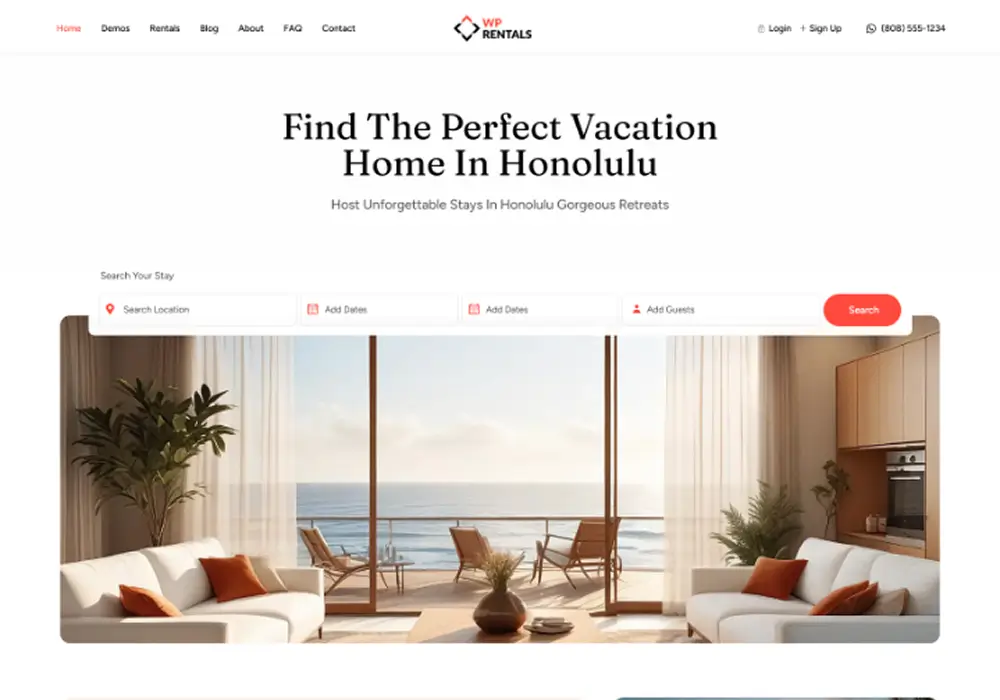
Once you’ve bought it, uploading is straightforward. Go to Appearance > Themes in your WordPress dashboard, click “Add New,” and then “Upload.” The setup wizard will walk you through installing the companion plugins , and yes, you need all of them.
Pro tip: If you’re overwhelmed by the demo import options, just pick one that looks close to what you want. You can always change everything later, which beats staring at a blank page.
Building Your Property Listings (The Fun Part)
This is where your cabins really come to life online. Each property gets its own page with photos, descriptions, pricing and basically everything a guest needs to decide if they want to stay.
Think about how you browse vacation rentals. You probably look at the photos first, check the location, then read the description if you’re still interested. Your guests do the same thing.
Writing Descriptions That Actually Work
From watching booking data, I’ve learned that guests want specifics, not fluff. Instead of “cozy mountain retreat,” try “3-bedroom cabin with stone fireplace, 5 minutes to hiking trails.” See the difference?
Your description should answer the questions guests always ask:
- How many people can actually sleep here comfortably?
- Is there WiFi? (This matters way more than you’d think)
- Can I bring my dog?
I always tell clients to walk through their property with fresh eyes. What would you want to know if you were spending your vacation money here?
The Photo Situation
Look, I get it. Not everyone’s a photographer. But in the vacation rental world, photos are everything. Guests book with their eyes first.
You don’t need expensive equipment; a decent phone camera works fine. Ensure you get good lighting (natural light is your friend) and show every room. Include some “lifestyle” shots too. Maybe the deck at sunset or the fire pit with s’mores stuff nearby.
WPRentals makes it easy to upload and organize photos. Just drag and drop them in the order you want guests to see them.
Pricing: The Art of Not Leaving Money on the Table
Most people get nervous about this, and I understand why. If the price is too high, the cabins will be empty. If it’s too low, the cabins will be empty, and the money will be given away.
The good news? WPRentals makes it pretty painless to adjust your rates as you learn what works.
Playing the Seasonal Game
Your cabin probably isn’t worth the same amount every night of the year. That lakefront property might command premium rates in July, but it needs competitive pricing in March.
WPRentals lets you set custom rates for specific date ranges. I usually start with a base rate, then bump it up 20-30% for peak weekends and holidays. You can constantly adjust as bookings come in (or don’t).
Most people miss the point: local events can be goldmines. That music festival is 30 minutes away? Jack up your rates. The annual fishing tournament at the nearby lake? Same thing.
The Weekend Premium Strategy
Most cabin guests book Friday through Sunday. You can (and should) charge more for weekend nights. It’s standard practice, and guests expect it.
I typically see weekend rates 15-25% higher than weekday rates. WPRentals can automate this, so you don’t have to adjust it manually every weekend.
Length-of-Stay Incentives
Longer bookings mean less work for you. No constant turnover, fewer cleaning cycles, and better cash flow. That’s worth rewarding with discounts.
A common setup is 10% off for 7+ nights and 15% off for 28+ days. Monthly stays are especially nice because they guarantee income with minimal effort.
The minimum stay requirement is your friend, too. Weekend minimums of 2-3 nights prevent those costly one-night turnovers that barely cover your cleaning costs.
Payment Processing: Getting Paid Without Headaches
Nothing kills a booking faster than a clunky payment process. Guests want to enter their info and be done with it.
Stripe vs PayPal: The Real Talk
Stripe keeps everything on your website. Guests enter their card details right there, complete the booking, and they’re set. It feels professional and builds trust.
PayPal redirects guests to their site, which some people prefer (they trust PayPal’s security), but others abandon because they don’t want to log in or create accounts.
My advice? Enable both. Different guests have different comfort levels, and you want to make it easy for everyone to give you money.
The fees are basically the same (around 3% plus a small transaction fee), so don’t decide based on saving pennies.
Full Payment vs Deposits
This depends on your property value and guest expectations. I usually recommend full payment upfront for cabins under $200/night. It’s simpler for everyone.
For higher-end properties, deposits make sense: something like 30% to secure the booking, with the balance due before check-in. WPRentals can send automatic reminders for the balance, saving you from playing collections agent.
Designing Your Site (Without Going Crazy)
Your website must look professional, but it doesn’t need to win design awards. Focus on making it easy for guests to find what they’re looking for and complete their booking.
The Homepage That Converts
A big hero image of your best cabin, with a search bar right up front. That’s your money shot. Guests should be able to check availability within seconds of landing on your site.
WPRentals comes with Elementor widgets that make this super easy. Just drag the search widget onto your page and customize it. Horizontal search bars work great over hero images.
Below, showcase 3-4 of your best properties with great photos. Consider it your most excellent hits album: lead with your strongest material.
Mobile Matters More Than You Think
Over half of your visitors will be on phones, and your site will lose bookings if it doesn’t work well on mobile.
Test everything on your phone. Can you easily swipe through photos? Is the booking calendar thumb-friendly? Are the buttons big enough to tap without accidentally hitting something else?
WPRentals handles most responsive design automatically, but you must check your custom content.
Testing Before You Go Live
This part isn’t glamorous, but it’ll save you from embarrassing mistakes that cost real bookings.
Create some test bookings yourself. Try different scenarios , weekend stays, longer bookings, different guest counts. Make sure the pricing calculates correctly and the confirmation emails work.
I always recommend having a friend (preferably one who’s not super tech-savvy) try to book a stay. They’ll catch things you’ve become blind to.
The Content Check
Read through all your property descriptions with fresh eyes. Are they accurate? Do they answer common questions? Any typos that make you look unprofessional?
Your photos should tell the story of what it’s like to stay at your cabin. If someone books based on your photos and shows up to something else, you’ll quickly get bad reviews.
Launch Day and Beyond
Getting your site live is exciting, but the real work starts now. You’re running a business, not just a website.
Keeping Your Calendar Current
Nothing’s worse than a guest trying to book dates that aren’t actually available. If you’re also listing on Airbnb or other sites, WPRentals can sync calendars to prevent double-bookings.
Block out dates for maintenance, personal use, or seasonal closures well in advance. It’s better to show unavailable dates than to cancel guests later.
The Metrics That Matter
Sure, traffic is nice, but bookings pay the bills. Monitor your conversion rate like how many visitors complete a booking.
If many people look at your properties but do not book, you might have a pricing issue or your photos are not meeting expectations.
Page speed matters, too. Slow sites lose bookings. Free tools like GTmetrix can tell you how fast your site loads and what you should fix.
Building Repeat Guests
This is where your direct booking site really shines. When guests book through your website, you own that relationship.
Send check-in instructions a few days before arrival with local recommendations. Follow up after their stay, asking how everything was. These little touches create loyalty that platforms can’t match.
Some of my most successful clients have guests who book the same week every year, sometimes years in advance. That kind of predictable income is gold for vacation rental owners.
The Bottom Line
Building your own cabin rental booking site isn’t rocket science, but requires attention to detail. WordPress and WPRentals give you the tool. The rest is about presenting your properties well and making booking easy for guests.
Will it take some time to set up? Sure. But once it’s running, you’ll have a valuable asset that generates bookings without paying platform fees. Plus, you’ll actually know who your guests are and be able to build relationships that keep them coming back.
The vacation rental market isn’t slowing down anytime soon. Having your booking site puts you in control of your business instead of letting platform algorithm changes and fee increases dictate your decisions.
Start with one property, get the system working, then add more as you grow. Before you know it, you’ll wonder why you gave those booking platforms a cut of your hard-earned revenue.
FAQ
What do I need to host a cabin rental booking site on WordPress without it crashing in peak season?
Start with proper managed WordPress hosting and make sure SSL is included. Managed hosting is emphasized because cheap plans often buckle under peak-season traffic, which can take your booking site offline when you need it most.
SSL is non-negotiable for a booking site because it signals that guest payment information is secure; without it, browsers can warn visitors away, which directly hurts conversions.
How do I install WPRentals and get the required plugins set up?
After you purchase WPRentals, upload it from your WordPress dashboard by going to Appearance > Themes, clicking Add New, and then Upload. From there, use the setup wizard to install the companion plugins.
You should install all the companion plugins the wizard recommends, because the setup is designed as a complete booking system rather than a mix-and-match set of tools.
What should I include in a cabin listing description so guests actually book?
Write specific, decision-making details instead of vague marketing lines. For example, replace “cozy mountain retreat” with clear features like “3-bedroom cabin with stone fireplace, 5 minutes to hiking trails.”
Make sure the description answers the questions guests repeatedly care about: how many people can sleep comfortably, whether there is WiFi, and whether pets (like dogs) are allowed. A practical way to do this is to walk through your cabin and note what you would want to know before spending vacation money on it.
How should I set pricing for seasons, weekends, and longer stays in WPRentals?
Use a base rate, then adjust it based on demand patterns. The approach described is to set custom rates for specific date ranges, increase rates about 20-30% for peak weekends and holidays, and raise prices around local events that drive demand.
For weekends, it is standard to charge more because most cabin guests book Friday through Sunday; a typical range mentioned is 15-25% higher than weekday rates, and WPRentals can automate this.
To encourage longer stays, add discounts such as 10% off for 7+ nights and 15% off for 28+ days, and consider setting weekend minimum stays of 2-3 nights to avoid costly one-night turnovers.
Should I use Stripe or PayPal for payments, and should I take full payment or a deposit?
Enable both Stripe and PayPal if you can. Stripe keeps the entire checkout on your website (a smoother, more professional flow), while PayPal redirects some guests to PayPal, which certain guests prefer for security even though others may abandon due to the extra step.
Fee-wise, the guidance is that they are roughly similar (around 3% plus a small transaction fee), so choose based on guest preference and checkout friction rather than trying to save a tiny amount.
For payment structure, full payment upfront is recommended as a simple default for cabins under $200/night. For higher-end properties, a deposit model can make sense (for example, 30% to secure the booking with the balance due before check-in), and WPRentals can send automatic reminders for the remaining balance.



