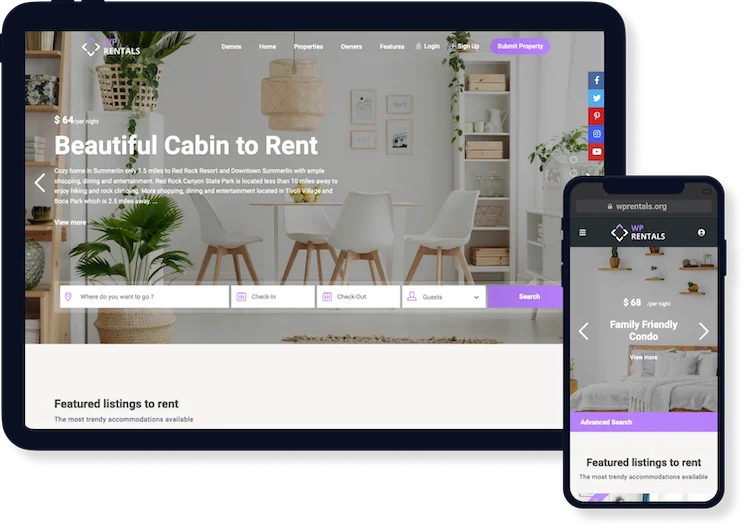
WpRentals is a highly customizable WordPress theme to list, find & book accommodations and objects
WpRentals is a premium booking theme loved by over 13,000 users and highly rated by 500+ customers for its flexibility, beautiful design, fast support, and clean, reliable code. It’s the perfect choice for building a professional booking platform that meets your needs.
24 Pre-made Demo Websites
24 website layouts come packaged right inside WpRentals. Each demo imported is customizable, and you can edit, mix and match features as desired from theme options
Main Rentals Demo
Honolulu - WpRentals Elementor Studio
Cabos - WpRentals Elementor Studio
Paphos Rentals Demo
Barcelona Rentals Demo
Maldives Rentals Demo
Single Owner - Multiple Properties Demo
Single Owner - Multiple Properties Demo
Single Owner - Single Property Demo
Single Owner - Single Property Demo
Single Listing and Single Owner Demo
Single Owner Multiple Properties Demo
Madeira Vacation Rentals Demo
Motorhomes Rentals Demo
Tuscany Vacation Rentals Demo
Hawaii Vacation Rentals Demo
Cancun Vacation Rentals Demo
Demo with Payments through WooCommerce
Ibiza Vacation Rentals Demo
Santorini Vacation Rentals Demo
Boat Rentals - Elementor based demo
Boat Rentals - Bakery based demo
Office Space & Events (hourly or daily) Rental
Ski (Object) Rentals by Hour
We constantly add new videos to our YouTube Channel presenting you in detail new theme features and how they work. Our latest videos are shared below. Subscribe for more.
Wp Rentals comes with a dedicated search form to seek properties by their availability, maximum guest value, and other fields you choose to use.
You have unlimited Options to design a Search form with WpRentals Search Form Widget for Elementor.
Vertical design search box aligned on the right side of the header. Location can be managed with Google Places, Algolia places or theme auto-complete.
Horizontal search design that can be placed over the hero header, before or after it. Location can be managed with Google Places, Algolia places or theme auto-complete.
On advanced type 3 you can use unlimited search fields. It gives you the freedom to create your search form with the options you wish.
With advanced type 4 your search custom fields will show in the extended mode of the form. You can use unlimited fields in that area.
With advanced type 5 you can design your custom search form and you choose this if you wish to have a vertical design positioned on the right side.
You can configure unlimited custom fields and features and amenities for this search form.
The results show instantly in lists and on the map when searching with any of the half map form fields.
WpRentals is extremely versatile and allows you to take control of every aspect of advanced search options.
Unlimited Custom Search Fields
You have the option to create search forms with unlimited fields and design your own search using default fields or your own custom fields.
Searched availability dates stay in the booking form
As you search for a property, the dates will auto-complete in the property booking form if you open the listing from search results.
Radius search and geolocations
Search for real estate properties located around a proximity point selected in the maps, in miles or km.
Ajax Search
WP Rentals theme supports AJAX to browse and find listings in real time. With this filter, the properties markers on the map will sync with the search property list results on the half map style page.
Move the map to find properties
This option allows the user see the properties in map view and in a list while moving the Map using drag-and-drop or zoom-in and zoom-out. Admin manages this search tool.
Location search with Google Places, Open Street or Algolia
For the location search field, you have the option to search using Google Places or Algolia auto-complete, which finds properties by country, state, area or city.
Location auto-complete or dropdown field
You can use the theme’s auto-complete system to find listings by location. This works only with the countries, states, cities, and areas saved in the theme database.
Search widget
There is a dedicated advanced search widget that can fit on any page sidebar, be it property page or blog post. The widgets form fields sync with your search form settings.
Search shortcode
With one shortcode you can add advanced search form and place it inside your pages. The shortcode form fields sync with your search form settings.
Half map results
Display search results as a half map page, with the map on the left, and the search fields with the properties list on the right. You manage the search fields for this form.
Standard search results
Show the search results page as a standard page. You can leave out the Map and add extra widgets on sidebar if needed.
Search Position Control
Choose where to show the advanced search form in header, floating, before or after your hero header. You can also remove the advanced search altogether.
Price slider values
Manage directly from admin area the minimum and maximum price slider values.
Amenities and Features
Include in the search form specific property features and amenities that apply to all your listings.
Multi-currency widget
Use a dedicated multi-currency widget to display the prices in different currencies.
WP Rentals theme comes with 4 pre-built designs for the property page. Each one will immediately call attention to the listing’s best assets and booking form.
Property Page Type 1
Property Page Type 2
Property Page Type 3
Property Page Type 4
Property Page Type 5
Custom Icons for Features & Amenities
Custom Icons & Fields in Listing Overview
Custom Icons in Listing Infobox
The property page displays the strong points of your listing and provides all the useful details for your visitors.
Hide location
Hide the location of the property for users who don’t have a confirmed booking. Turn on / off this option from admin.
GDPR checkbox for contact
Enable GDPR terms for contact form and write your specific terms in a separate template.
Show reviews
Show property reviews on the property page. Only users who have a confirmed booking can leave a review.
Booking form
Each property has attached a built-in booking form. Only available dates can be booked.
Availability calendar
Each property has its availability calendar to show the free and the booked dates.
Lightbox image gallery
Click on any image property to see the lightbox gallery. It allows visitors to check all property images in a user-friendly view.
Add a Youtube or Vimeo video
Add a video from YouTube or Vimeo and it the player displays directly on property page, next to images.
Virtual tour
Include animated virtual tours. These tours are created with separate software, but they have a big impact on your visitors.
Unlimited custom fields
The new fields can have dropdown, text, number and date format and will show under Property Details below the default fields.
Sleeping arrangements
Show the type of beds in each bedroom in a dedicated section available on the lisitng page.
Custom price details
The special prices will be published in a dedicated table to help visitors detect different rates by night, by weekend, by guest and so on.
Features & Amenities
You choose which features to add, group them, and add custom icons to each amenity.
Terms & Conditions
Show visitors in a separate section what are the general terms and conditions set as owner.
Similar Listings
On the property page, you can put on display the latest 3 similar listings from the same category, type, and city.
Contact owner
Easily send a message to a property owner. The message will be sent to owner’s email and to the owner’s Inbox message system.
Yelp -What's nearby
Your visitors will need to learn about the vicinity of your property and you can address this with Yelp.
Add to favorites
Adding to favorites feature is available only for registered users so this is a great enticement for signing up.
Share Property
With this feature you can share your property page on social media platforms such as Facebook, Twitter or Pinterest.
Create a property listing page and manage its content from Theme Admin. You can add and erase properties from list, choose the sidebar and widgets positions and more.
Create Lists by Categories
Select from admin which property categories you want to show in list, and in which order.
Ajax Filtering
Search properties with AJAX in the same page, fast and efficient. There are different ways to use this system.
Creative design
You have several options to design your lists. We offer different property card design types.
The half map design can be created as a standalone page, or set for the advanced search results page and the property taxonomy page. Property cards can be shown as list or grid.
An elegant design to list properties, with a sidebar on the left, or the right or no sidebar at all. with sidebar you can add extra widgets that grab your visitors’ attention.
Wp Rentals offers 4 design types for the property unit card. Each of them displays the most important info about the property. Card type 3 can e customized with your fields.
Property Card Type 1
Property Card Type 2
Property Card Type 3
The WpRentals theme is developed by wpestate.org as fully responsive and works great on all devices, including smaller screen resolution.
It has a clean design that ensures fast loading and easily adapting to the size and capabilities of the device. Therefore, it offers visitors an excellent mobile experience.
The Rentals theme offers enhanced header design options such as color management, transparent header, Mega Menu and more.
The property page supports different elements that can be turned on and off, depending on what you wish to showcase as part of your listings.
Mega Menu
The theme has a mega menu, with custom widgets. You can show the menu items on 3 or 4 columns, separated by a border or decorated with a beautiful background image.
6 Hover Options
To enhance your site appearance, the theme includes 6 different hover types for the main menu area. You also have full control of the colors of the entire menu area.
Customizable Top Bar
Add extra top bar widgets above the menu area, an area dedicated to contact information, social accounts, multi currency or multi size widget or any other widget you wish to show.
Login & Register Section
The login / register area is managed from admin options. You can turn this on / off at any time, and you can also add extra options: social login, type password or let the system create the password, recaptcha.
Transparent Header
Transparent header is an elegant touch for websites nowadays, especially if you wish to add an interactive header media banner, a video or a slider. You can set transparent header for all pages or for specific ones.
Mobile Header
When entering responsive mode, you can show a particular menu just for mobile devices. The menu items are fully managed from admin by you, as well as the mobile menu colors
The header media is the area below the main menu and before the content area. You can customize this section in order to display various content and functionalities. See the following for details.
Video Header
Choose a custom overlay color for a special effect, set video in full screen or add a custom height, as well as other features.
Parallax Effect
Use Parallax for your header images. Add an overlay color when necessary for an elegant effect, choose transparent header effect and more.
Splash Page
Splash pages are used to promote your company and products, and with Residence, you get three design variations for such a template.
Create gorgeous headers with Revolution slider plugin. Or import our demo sliders and get started right away.
Choose as header a built-in theme slider with your favorite properties.
Choose as header a built-in theme slider with your favorite properties. This is the properties slider version 2.
Choose a custom overlay color for a special effect, set video in full screen or add a custom height, as well as other features.
Choose a custom overlay color for a special effect, set video in full screen or add a custom height, as well as other features.
Your options for maps include: Open Street or Google Maps, price markers or custom pin images, custom height or full screen and more.
Splash pages are used to promote your company and products, and with Residence you get three design variations for such a template: slider, video or image.
Manage properties and their prices, see bookings, reservations, and messages, all directly from front-end user dashboard. From here you also update profile with your contact details.
Dashboard Account Overview
Dashboard Profile Management Page
Dashboard View with User's Properties
Submit Listing Form for User
Dashboard View with Edit Property Calendar
Dashboard with all in one calendar view
Dashboard View with My Reservations
Dashboard view with My Bokings as Owner
Dashboard View with Invoices Issued
Dashboard view with Inbox Messages
Dashboard with User's Favorite Listings
Dashboard with Membership based Submission
The property page supports different elements that can be turned on and off, depending on what you wish to showcase as part of your listings.
Favorite Properties
Visitors can save favourite properties and they show in a list in their user dashboard account.
Limit submissions to specific users
You can limit the options to add and manage properties for particular user(s) only.
Instant Messages Inbox
Users can exchange messages though the theme using a private message system, visible to admin in backend.
Verify owner from My Profile
Show a verified badge on owners profiles who send proof of their ID as an image attachment from their profile page.
Profile management
Enter the user dashboard and manage profile info includes a personal photo to display on the profile page and a detailed description of the owner.
Add property in steps
Manage listings from a dedicated dashboard. The property settings include details, prices, ICAL feed & calendar management and more.
Add custom prices for specific periods
When adding a new listing you have the option to set custom prices for specific days with the custom price calendar.
Manage Properties
Owners can disable or enable a published property, delete a listing or edit it at any time. Search for a specific prop using a dedicated search tool.
Separate users on registration
WpRentals offers the option to create separate user accounts for booking users and booking & renting users. The later ones can create an owner profile and add properties.
All in one calendar
See all your properties and bookings in one place. From the same area you can add manual bookings for specific listings.
Manage bookings received
The owner manages bookings requests from My Bookings page, by approving, rejecting or canceling if the case.
Manage reservations sent
My Reservation page shows status of requests sent, allows to pay the deposit if required, and cancel the request if it’s not yet confirmed.
Add Reviews
Users who have a confirmed reservations can add their review after the booking period ends directly from My Reservations.
Issue invoice with discount or extra fees
To confirm a booking request received, the owner is able to view details, add discounts or extra fees to the generated invoice.
Contact owner
User with a reservation sent (pending) or confirmed can send a message to owner inbox directly from his dashboard account.
Monetize the theme and turn your website into an income generator. Set up payments via PayPal, Stripe or Wire Transfer or choose WooCommerce merchants.
Booking service fee to admin
As site admin you can charge a service fee for every confirmed booking deducted from total value. The fee may be a percentage of the booking price or a fixed amount. The owner contact details will be shown for confirmed bookings only.
Deposit fee to admin
From admin, you can set the deposit value in percentage or as a fixed rate. The fee applies to every booking and will show in user dashboard for each reservation. The deposit can be 0, or can be set to include the service fee only.
Pay remaining balance to admin
The user will see the remaining balance to be paid and is able to pay it to site admin from his dashboard. For this option, the theme sends a reminder 3 days before start of booking.
Membership Submission
Create membership packages for each user role, and set for each package the number of included listings, a number of featured properties included, and package duration in days, weeks, months, or years.
Paid Submission
Enable the possibility to pay per listing and each user who wishes to publishes a property will have to pay a fee before. The theme allows you to add an extra fee to make a property featured.
Recurring membership payments
WpRentals supports recurring membership packages for property submission. Users will see the recurring checkbox when upgrading their free trial to a paid membership package.
PayPal payments
Just add your PayPal account API details and the payments will automatically be processed to your PayPal account, be it regular or recurring membership submission payments.
Stripe payments - SCA Ready
WpRentals theme works with Stripe, a trusted credit card payment system. In site admin, add your own Stripe account API details, and the money received through the theme will be directed to your Stripe account.
WooCommerce Payments
if you need a different merchant to process payments for deposit or paid submission, install WooCommerce free plugin and use their supported merchants. The theme supports this option as alternative to theme Paypal and Stripe.
Wire transfer
Users can make offline payments to you using Wire Transfer and send you the amount directly to your back account. From admin, you will activate their booking after you receive the payment confirmation.
Invoice details
The registered user can see generated invoices in user dashboard when confirming a booking. Also, when buying a membership package or a paid listing an invoice is automatically issued. The user can filter and sort invoices by date and print them.
Choose payment currency
From admin, set the payment currency using a dedicated drop-down that lists all currencies supported by PayPal or Stripe. Additionally, in theme options, you can add any currency you need if you choose Wire Transfer as payment method.
Let users check-out and pay as soon as they decide on a booking by enabling Instant Check-out. Login and register steps will be done automatically as users finish the payment.
As site admin you can choose to set 0 value for deposit and 0 value as service fee. Users interested to rent can send booking requests if calendar is available and owner can approve the request manually or automatically.
WPRentals can be used for multi owners or single (specific owners). If you allow it as admin, people register to add listings for rent and users register to send booking requests to property owners, similar to airbnb or homeaway.
Social Login by Facebook, Google or Twitter
These options are on/off from theme options. Social login instantly redirects users to their profile using their social account email details.
Single site owner
If you develop the platform as a single owner website, in admin specify which user has the owner rights to manage website listings.
Selected Owners Only
You can manage from site wp-admin who are the users who can add listings and give the submission rights to multiple owners, but manually selected.
Separate Users on Registration
From admin, you can place users in two categories on registration step: users who want to book and users who want to book and rent. Only for users who specify their intent to rent the theme will create their own owner profile.
Redirect URL after login
You choose if the user stays on the same page after login, or if he is redirected to a specific page. Users always stay on the listing page if they login from there. This does not apply to socail login.
Contact Owner
The contact owner form is open to registered and non-registered users. Registered users send messages that go straight to the owner’s dashboard and the owner will receive an email notification about the new message.
The owner profile displays a list of properties, customer reviews and contact information. The later one is available only for users who confirmed reservation for that owner.
Owner Profile View for Users without confirmed bookings
Owner profile to registered users with confirmed bookings
You can easily manage theme options in admin, from elements design to custom property fields, google maps and more. Check below screenshots for extra info.
The theme comes with several shortcodes that will help you build your pages without coding skills. Additionally, you benefit from various Elementor or Bakery ready shortcodes that are included in the WpRentals package.
Listing shortcodes
You can draw attention to the best of your listings with specific shortcodes. Designed to create a list, a slider or to add single featured properties published on your website.
Blog shortcodes
WpRentals offers the possibility to showcase your blog using specific shortcodes: blog articles in a list, a slider, or display the best article using Featured Post shortcode.
Categories display shortcodes
The theme includes various shortcodes to show particular listing categories as list or slider. Add a featured image for each to display in the created list.
Single booking shortcode
You can draw attention to the best of your listings with specific shortcodes. Designed to create a list, a slider or to add single featured properties published on your website.
Advanced Search
WpRentals offers the possibility to showcase your blog using specific shortcodes: blog articles in a list, a slider, or display the best article using Featured Post shortcode.
Login and Regster shortcodes
The theme includes various shortcodes to show particular listing categories as list or slider. Add a featured image for each to display in the created list.
WPRentals includes integration for the most popular plugins, including Elementor Builder & WooCommerce for processing payments and offers you as included 3 premium add-ons with the theme license purchase: WpBakery Builder, Ultimate Addons and Rev Slider.
You are purchasing from Envato Power Elite authors, with proven 5-star record for customer support and more. The theme has been rewarded with the Envato Compliant Badge, an audit for themes that are up to the latest WordPress and Envato Coding & Securitiy standards. We are here to help with any question you may have.
Website owners, freelances, agencies, everyone can use WpRentals to build a powerful real estate website.